Lightroom or iView for DAM? It's such a big question, an amorphous one too, and I've not had much spare time recently. But I spent a bit of time giving an answer and thought I'd add it here too. The devil is always in the detail of one's personal needs and right now I am not controlling my pictures with Lightroom and still rely on iView. After all LR is only a version 1, iView is more mature, and DAM is all about certainty.
If forced to rely on LR, I could just about do so. My view is that LR's glass is half full, not half empty, and the following “why iView not LR” comments should be read in that light.
iView's performance is fine. Specifically, I refer to the speed with which thumbnails become visible after changing to a certain folder, or keyword filtration. LR's performance on my main PC is well below what I think it should be on that machine (2.2 ghz P4 with 1 gb ram and 25g mb video card). I don't mind the time it spends building its previews, and can do something else, but thereafter I expect the app's scrolling speed to match programs like iView. And I'm just not getting it.
I need to manage a wider range of file types than LR accepts. It would be OK if I simply wanted to manage photograph file formats, but for my writing I also have png files (screengrabs off the Mac) and Word documents. I'm not into video or audio, but LR is only intended to manage a photograph-only workflow.
But within a photograph-only workflow, there are other file type limitations that may be relevant. LR doesn't import images that are over 10000 pixels in any direction - not normally an issue, but a problem if you shoot panoramas. Photoshop CS3 is very much better at stitching and I can see that I won't be the only one to do more of this type of stuff. The Photoshop team have shot the LR team in its foot….
LR will not write metadata into raw files. That is Adobe's stance, but I see no problem writing directly into working raw files IF you are wise enough to keep virgin backups too. It's my call, and I like that iView sees it that way.
With iView I see my Nikon raw file's preview, while with LR I see Adobe's interpretation of it. In general, this is no bad thing because you often shoot to capture all the highlights for example, not to make the camera-generated preview equate to the finished article, and I do like to see my raw adjusted version of the image (some people like a Nikon Capture and iView combination for this reason). But it's not so welcome when you've done things like use your camera's b&w setting - in iView I see the preview in b&w, while LR shows Adobe's colour rendition of the raw data. While I accept LR can't get at Nikon's secret sauce, it can and does display that mono preview and so it should be able to store it. Now I only use the mode to get rid of IR captures' purplish cast, and as a b&w man I've always shot on the assumption that the negative or digital file isn't the finished article. But if you believe you get your shots absolutely right in camera (eg WB, sharpening etc) then you would get value from being able to compare the camera-generated previews.
I prefer iView's catalog sets, custom fields and people fields, to LR's collections. One can just about replicate the functionality, so my objection is more to the immaturity of the interface. For example, I hate how when I add a collection in LR, the database filters down to that collection. So imagine I'm using a collection for a wedding or vacation, and dividing it up into phases or themes, each time I add a new subcollection I then have to go back to the main one. It's the same with keywords - add a new one in the left panel and the whole database filters down to it.
I could go into lots of other details, but I'd be going too much into my own needs. You know what you need. Both products have free trials, so I wouldn't listen to me!
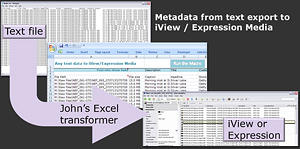 In my former life I did a lot of data migration, moving finance and other business information between old and new systems. Moving metadata between cataloguing systems isn't very much different and I've moved quite a number of photographers' metadata into iView (now Expression Media) using an Excel application as a bridge (from there it's an easy enough jump to Lightroom or Aperture).
  The follow up question asks about future plans for doing the stitching in Lightroom. That’s fair enough, but as usual the focus is on the image processing – and the management side needs work too.
 Thinking of Lightroom, the first part of the solution leaves the underlying mechanism as it is now, but users would have to choose a “stacking type”. One might be “best of burst”, so exactly as now, but choose “panorama” and the thumbnail would be shown as a strip of tiny thumbnails, and “blend” would give the thumbnail a more 3d stacked appearance. Now the user can see exactly what type of images are present in the stack.
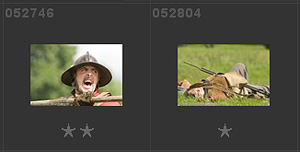 While I've been happy enough continuing to generate my private web galleries with iView, I have also played with Lightroom's templates, and the image shows one that has ratings displayed on the thumbnail and which replaces the item number with my unique 6 character reference code (positions 8-13 of my originals' filenames eg “YYMMDD_123456 something.dng”).
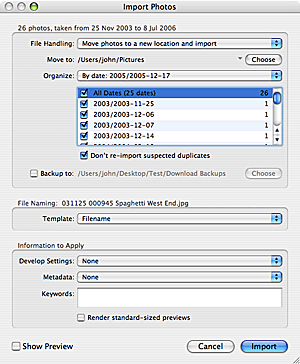 Lightroom normally exports files into a single target folder, but it's not an unusual to want those exported files to be in date-based folders - that's especially true if your originals were organized in a date-based folder hierarchy. It's not as awkward as you might think.
 When you write a book on version 1.0 of a program, things are very much in flux. Apart from your publisher's deadline. Features change subtly and others are pulled at the last minute, or later, and you're never going to anticipate what might will appear in a dot release just a few months later - days after your book hits the streets. So while I'm not going to list the detailed changes (I recommend reading through