Syncomatic 1.23 now syncs into stacks
Version 1.23 of my Lightroom plug-in Syncomatic is now available via Photographers Toolbox. The new feature is that now, as well as handling files with matching names, it can now synchronise metadata and adjustments within stacks
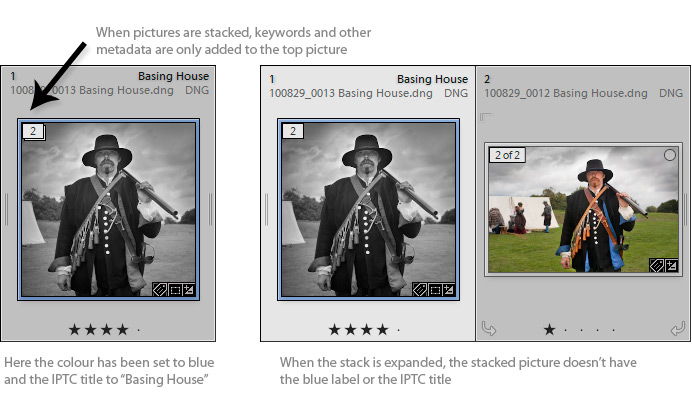
When you add metadata like the title or keywords to a stack, Lightroom only updates the picture on the top of the stack – items lower down the stack are not updated. So if you do want all members of the stack to share similar metadata, you first have to expand the stack and select all the items. Then after adding the metadata, you would collapse the stack again. For some users, that is OK because they will only keep the best image and don’t want to annotate the rejects. But for others it’s pretty inefficient, for instance stock photographers or those who use stacks to gather frames intended for panorama stitching. For them the stacks-metadata problem is often a reason for not using the stacking feature.
Sync Stacks is intended to overcome that problem. It adds a menu command and:
- Loops through the selected pictures
- Finds images that are at the top of their stacks
- Copies their metadata to the rest of the stack
Running Sync Stacks
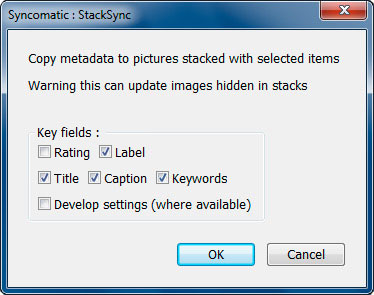
Select the pictures including some which are in stacks and choose the mnu command Library > Plug-In Extras > Sync Stacks. You are then presented with a dialog box.
Sync Stacks will normally copy all IPTC metadata. But by default it excludes the star rating – that’s because the top item in the stack often has a different rating from the rest of the stack.
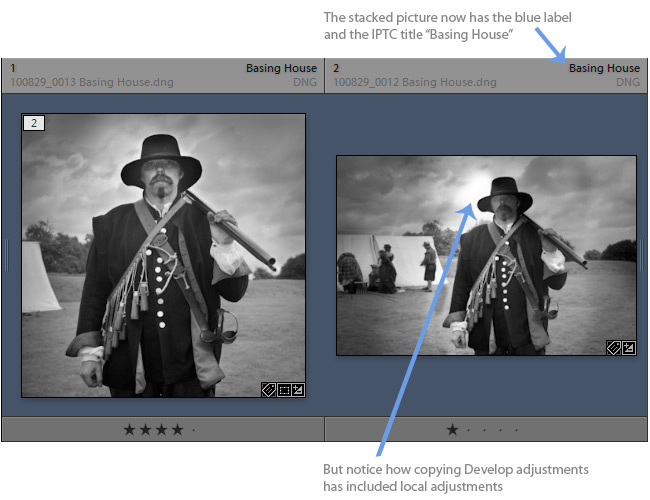
Sync Stacks can also copy Develop adjustments. It may be what you want to do, but be careful with this feature.
When you are have ticked the appropriate check boxes, click OK. Otherwise, click Cancel.
Launching in collections
Lightroom’s stacking feature is normally only accessible through folders. However, as well as working in folders, you can launch Sync Stacks when you are working in collections. In this case, as soon as Sync Stacks finds a top-of-stack picture in a collection, it updates the hidden or stacked pictures wherever they are in the catalogue.

Hi John,
I’m trial-ing your Syncomatic from the Photographer’s Toolbox.
This functionality is something that has long been missing from LR.
Just a question: Could you incorporate image rotation into the list of attributes that gets sync’d?
It appears that LR treats 90 degree rotations (command-[ on a mac) differently from “rotation adjustments,” which I assume would be sync’d as a Develop adjustment.
As it stands, If I import shots that need to be rotated, I don’t see how to force the stack underlings to also rotate.
Thanks for your work!
I would love to offer this, but unfortunately Adobe haven’t yet extended plug-in access to crop and rotate. Sorry!
I was afraid that might be the case.
Cheers.
Hi John,
I was trying to use the plug-in to sync development setting from DNG ro RAW (CR2 in my case). It seems it works only with .raw files, not with files with other extensions. Is this correct, or am I overlooking something?
Cheers,
Max
No, it uses the file type which you would see in Library’s filter panel, so it ignores the extension and relies on how Lightroom sees the images. So when you see “raw” in the drop down box, that’s NEF, CR2 etc
John,
thanks for the fast respone. It works as advertised! Maybe I made some mistake when selecting files when I tried it the first time.
I’m really glad I bought Syncomatic. Save a lot of time when copying metadata and development settings between hundreds of files
Just one mor question (maybe I didn’t get it from the documentation):
I would like to keep the development status (i.e. the “modified” icon in the film strip and grid view) of my images when copying settings from DNG to RAW. If I sync everything at once, also the RAWs whos DNG counterparts haven’t been touched by me are getting the “modified” indicator. The only way around this I found so far is first syncing the metadata of all images and then have a second round where I only select the modified DNGs and their RAWs and sync development settings.
Is there an easier way to acomplish this?
Max
OK, I understand. I think I can improve how that part of the plug-in works – look out for an update in the next day or two.
Max, take a look at version 1.27 which, I believe, fixes this problem.
John,
in general, this seems to work. But croping information is lost now (did work before). What is still not copied is collection information.
Best,
Max
I don’t think cropping information was ever included, Max, because there is no mechanism of applying the crop data to other images (see Clay’s comments). Collection info? OK, I’ll consider that for the next update – it should be possible.
John,
your right, cropping information wasn’t included. Seems I lost it in the transfer of settings. My fault (deleted many of my DNGs already).
John,
There are two more things I’d like to mention now that I processed around 1.500 pictures:
1) Could you please look at this issue: time per picture for syncing seems to be depending on the amount of pictures selected. I’m syncing here batches of several hundreds of pictures and the more picturs selected the slower syncing is per picture. If I selct only 10 pictures, it is app. 1 sec. per picture. If I select 200 pictures it is app. 4 sec. (on a i7 920 with 8 gigs of RAM).
To me it seems that some lookup is going on (to find the matching pictures?) which takes longer the more pictures ar in the batch. Processing time gets faster towards the end of the batch (when the list to search in gets shorter?). So in larger batchesmore time is spent for lookup then for syncing. But maybe thats some inefficiency in LUA…
2) I had to interrupt one batch and when I tried to start a new one I got a message that some processing of the plug-in is already going on. It seems the sync task doesn’t get properly stoped and completes in the background (at least for some time).
Besides these minor issues, Syncomatic is really a great tool. Saved me several hours and thousands of mous clicks
Best,
Max